Custom Analytics Integration on iOS
Video analytics provide tremendous insights into your user's QoE, bring extra business intelligence and enhance decision-making. There are a wide selection of analytics systems in the current landscape (e.g. Google Analytics, Conviva, ...), often with their own focus, expertise and value.
What most video analytics systems have in common is that their insights (partly) originate from video events:
playevent: a user clicks the play button, or resumes playback after a pausefullscreenevent: a user goes fullscreen on their devicequalitychange event: the video quality switches from a lower resolution to a higher onewaitingevent: the video is stalled and unable to continue playback for some time- ...
To access these video events, and forward them to a video analytics system, an application developer must hook into the video player API.
This guide explains the role of the THEOplayer API. Additionally, it explains how to do a custom integration with an analytics system, with Google Analytics as a sample case. This guide should be useful when THEOplayer doesn't have an existing sample integration with a specific (commercial) video analytics service, or when you want to fully control the data flow.
Keep in mind that Google Analytics is not the only analytics system out there. The APIs and concepts that we'll discuss are relevant for all analytics systems. For example, you can easily swap out the Google Analytics example with something like Nielsen or Youbora (NPAW), or even your own custom analytics back-end.
Prerequisites
There are two prerequisites in order to continue with this guide:
- You have a THEOplayer license. You can grab a license at https://portal.theoplayer.com.
- You have some basic knowledge on how to use THEOplayer, and can navigate comfortably through the API to find relevant events.
Refer to our getting started guide before advancing to the code samples.
API
You can access the video data through the THEOplayer API. Through the API, you can subscribe to events, and attach a callback.
For example, when the ended event is triggered (meaning: someone completely watched the video),
your callback could be that when this happens, you do a request to a remote video analytics service.
Events are organized across interfaces and subinterfaces, as illustrated by the image below. For example, the player
contains general video player events like play, pause and ended.
The ads interface contains events related to advertisements, like adbreakbegin and adend.
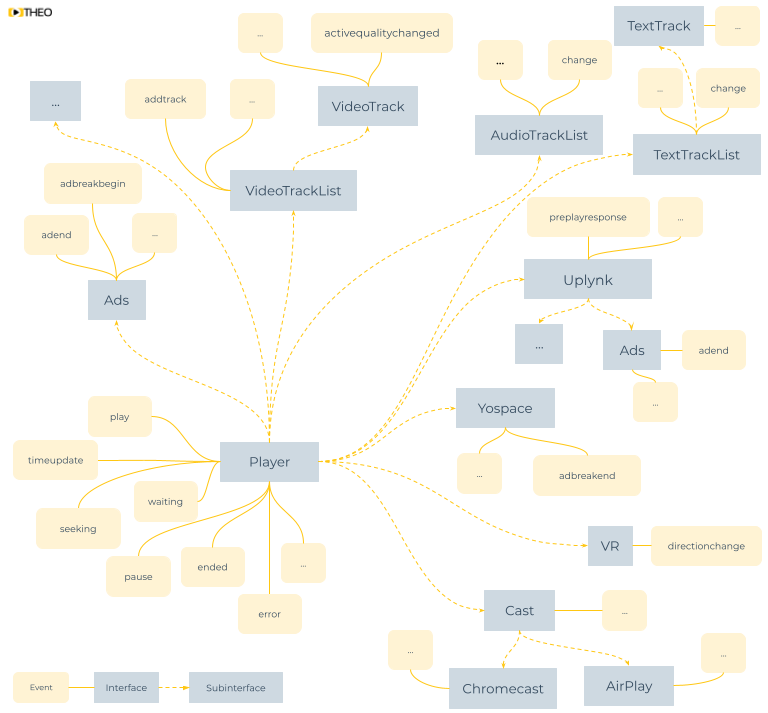
When creating a custom analytics implementation, you must familiarize yourself with the relevant interfaces and events. Below is an (incomplete) list of some common interfaces and their event maps.
- Player: general video events, like a play, a pause, and so on.
- Ads: to detect when an ad starts and stops.
- AudioTrackList: to detect when a new audio track is added, or when another audio track becomes active.
- TextTrackList: comparable to AudioTrackList, but for subtitles, closed captions and metadata (e.g. id3, emsg, EventStream, EXT-X-DATERANGE).
- Cast: AirPlay and Chromecast events.
Video quality events are unavailable on iOS due to Apple limitations.
Note that maintaining the above list manually is unfortunately a no-go because our interfaces evolve. This means that you should research your events through our API reference.
When doing a custom analytics integration, you should also check our articles on error handling.
Video analytics metrics and events
Let's discuss some popular metrics, and how you could track them with video player events.
Plays (or Impressions). This metric represents the amount of plays.
You can calculate this event by identifying the first playing event after every sourcechange event.
Video Startup Time (or Time-to-First-Frame or Join Latency). This metric represents the time it takes your video to start.
You can calculate this event by calculating the difference between the timestamps of the first playing and the first play event after every sourcechange event.
Seek Time (or Seek Latency). This metric represents the time it takes for your video to resume when you scrub to another position.
You can calculate this event by calculating the difference between the timestamps of the seeking and the seeked event.
Watch Time. This metric represents how much time is spent watching content by your viewers.
You calculate this value by tracking the playing event, and halting it when the waiting, pause, ended or error event occurs.
Rebuffer Ratio (or Stalls). This metric represents how often the viewer is watching the "spinner icon" versus the actual video.
This metric is closely related to the Watch Time.
You can calculate this event by tracking the waiting event, which is triggered when the video starts to stall, and the playing event.
Average Bitrate. This metric represents the average video quality that your viewers are watching.
You can calculate this metric by tracking the activequalitychanged event of the active video track.
Average % Complete (or Watched Ratio). This metric represents the relative completion rate of your videos.
This metric is related to the Watch Time, and related in a similar fashion.
You could also use the player's duration to determine the length of the asset.
Exit Before Video Start. This metric represents how often your viewers aren't able to start the video, even though they had the intent to watch it.
You can calculate this metric by tracking the first play event, and it never getting to the playing event.
Video Playback Failure. This metric represents how often your viewers have a problem with playback once a video starts.
You can calculate this metric by tracking the error event after the first playing event.
Note that these proposed calculations are only loosely formulated to help you understand the relationship between video metrics and a video player API.
When talking about metrics, you often apply dimensions or filters to a metric. For example, when talking about the "Plays" metric (see above), the base metric would apply to all logs throughout all time. When analyzing your data, you might want to apply a filter (or dimension), such time (to consider all "Plays" for a specific period of time), asset (to research a specific asset), user (to check a specific user's activity), and so on. It is up to you (or your commercial analytics service) to associate certain dimensions with a raw video player event.
Session management
It's important to note that THEOplayer doesn't associate a user ID or session ID with an event. (This is pretty normal, because THEOplayer is a client-side video player library. It's not aware of your "back-end" "CMS", "users" or "sessions".)
When you are implementing an analytics service, you usually want to associate a session or user with an event when forwarding the event to your remote analytics database. As an app developer, it is your responsibility to do this association.
Integrating Google Analytics
Refer to Google Analytics' documentation at https://developers.google.com/analytics/solutions/mobile if you're interested in integrating Google Analytics. Similar to the Web SDK, developers would subscribe to events and properties emitted by THEOplayer and create a custom mapping to the Google Analytics library.
Conclusion
A custom analytics integration gives you full control over your code, and the data you want to submit to your analytics system. This data is exposed through the THEOplayer API, and allows you to subscribe to events such as the start of an ad, or a direction change event in 360/VR playback.
Extra resources: